Apple Mac Pro Bluetooth Cable Bedienungsanleitung Seite 12

  • Herunterladen
  • Zu meinen Handbüchern hinzufügen
  • Drucken
  • Seite
    / 22
  • Inhaltsverzeichnis
  • LESEZEICHEN
  • Bewertet. / 5. Basierend auf Kundenbewertungen
Seitenansicht 11
Removing / Replacing the Airport Card
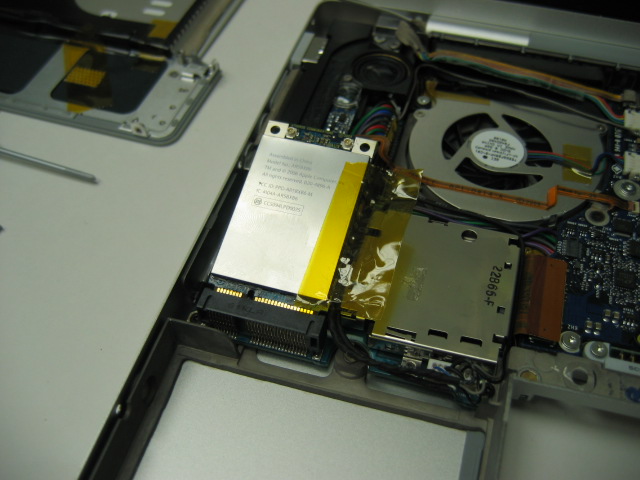
The Airport card is located on the left side of the MacBook just
above where the hard drive normally sits. There are two antenna cables
attached at the top of the card marked above with circles. These
need to be removed in the same way as the Bluetooth antenna
cable was. It is best to use needle-nose pliers or a spudger
and pull straight up on the end connector so the pin is not
damaged. It shouldn’t take much force to disconnect them.
You need to be quite gentle with them because if they break,
they will need to be replaced. As pictured above, there will
usually be a piece of tape on the right side of the card. Peel
this off from one side. The card should now be free to pop up. Once it is
popped up as show in the picture above in the bottom right, the card can
now be slid towards the rear of the machine to be taken out of the
slot. The Airport card should now be free and ready to replace
if need be. These cards are going to be compatible with
802.11b, 802.11g, and 802.11n* wireless networks. It is not
necessary to use an Apple Airport base station. Any third
party base station should function with the Apple Airport
card.
* Apple released purchasable software to enable this feature.
[12]
Includes
802.11n support
Airport Extreme
This is Airport’s
successor to the Airport
Express. It uses the new
802.11n protocol and
offers incredible
improvements over the
802.11g protocol. Most
MacBooks are going to
have this disabled. Read
below for more details.
AIRPORT EXPRESS
LOREM IPSUM
ALIQUAM
BIBENDUM
CURABITUR
DAPIBUS
Sodales nulla
Ante auctor ex-
cepturi wisi,
dolor lacinia
dignissim eros
condimentum dis
pellentesque,
sodales.
Lacus nunc
Feugiat at. In
orci ligula sus-
cipit luctus,
sed dolor
eleifend aliquam
dui, ut diam
mauris.
Ut facilisis
Ante in dui ac
suscipit, turpis
voluptatum do-
nec, fusce sus-
pendisse, quasi
luctus amet urna
tempor amet sit.
Cras volutpat
Mattis hasellus
justo massa sed,
odio feugiat
gravida nunc
praesent. Quam
ac ligula risus
lectus dapibus.
History of the Apple Airport
The original Apple Airport and Base Station was introduced in July 1999. It used the 802.11b protocol
which offered transfer speeds of 11Mbps. (Mbps: Megabits per second)
In January of 2003, Apple released the Airport Extreme which used the 802.11g protocol which greatly in-
creased the bandwidth to 54Mbps. This allowed a much higher level of data transfer over a wireless net-
work including dependable streaming video and music.
In January of 2007, Apple announced the newest revolution to wireless networking with the Airport Express which has adopted the upcoming
802.11n standard. This new protocol offers bandwidth and range increases of several magnitudes.
EnlargeEnlarge
Seitenansicht 11
1 2 ... 7 8 9 10 11 12 13 14 15 16 17 ... 21 22

Kommentare zu diesen Handbüchern

Keine Kommentare